Behavior Tree Assignment Walkthrough
In the fall of my Senior year, I took a Game AI course. Looking back, my work on Somniphobia would have benefitted a lot from the knowledge I attained from this class, but, you live and learn, right?
Our first coding assignment tasked us to implement 4 behavior trees, at least 4 layers deep, and put them in a level. After submission, the top 10 assignments were nominated to earn an extra 5%. My project was among those top 10, but I didn't get the extra points.
The Setup
Tools Used - C++, Visual Studio 19+, BehaviorTreeEditor.exe, DirectX collision library
The provided environment was mostly complete, but we were free to edit it however we liked. The goal of the project was to be able to understand and use behavior trees.
We also had a visual editor to create the behavior tree logic, which required relatively minimal setup:
- Define the behavior tree node in C++
- Register the node in a specified ".def" file so the behavior tree editor can use it
- Setup the logic in the editor, save the behavior tree from the editor
- Define the saved behavior tree in a specified ".def" file so that the C++ can use it
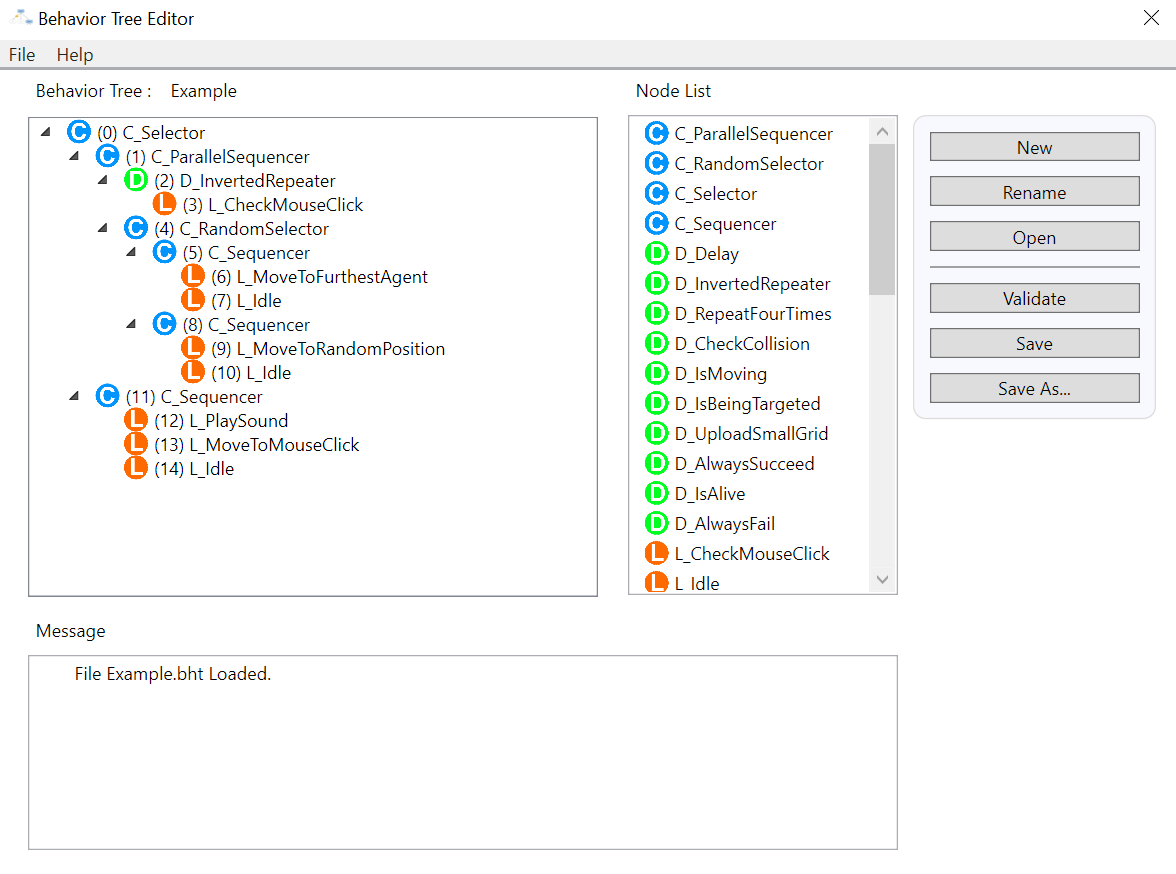
The behavior tree editor
We had 3 types of behavior tree nodes to create and use:
- Decorator - additional logic that can be used to modify the behavior of its child node (how many ticks, inverting the outcome, etc.).
- Control Flow - manages the order and conditions under which children nodes are executed.
- Leaf - the execution units of the behavior tree (kill enemy, change its color, move, etc).
For this assignment I created and used a total of 10 new nodes in combination with other control flow and decorators. 4 different behavior trees were created and used in total.
The Implementation
First of all what's the scene? What are the personalities in it? This is as much a creative problem as it is technical. The scene should be interesting!
Well, of course, it should all be Mario, father of gaming. Unfortunately I couldn't afford animations, but I got the models.
Behavior Tree #1: "RotateToTarget"
An agent of chaos. Murder everything in sight. It doesn't matter who.
In a parallel sequencer:
- Find a random target, battle cry, rotate toward the target, kill, then stay still. Repeat.
- Randomly change color to blue, then back, then blue, then..
Behavior Tree #2: "Fleeman"
Try to avoid the death staring into their eyes. Panicked.
In a parallel sequencer:
- If I'm not dead, find the death that's chasing me, then find every way to avoid it.
- If I've collided with the deathly hallow, then I must scream, change my color to red, and die.
The behavior for avoiding was some heuristics I came up with on a whim:
- Form a ray from the agent's position to the four corners of the square grid. If the ray hits the evasion target (Mario in this case), or is in the general direction toward it, find the next corner.
- If no corner was found, find an agent to move toward that won't kill the Fleeman. Or stand around and die.
Another thing to figure was how to tell the agent about the grid-space itself. My solution was to put a root node that "uploads" the corner positions to the tree's blackboard which will be retrieved in the evasion leaf node.
Behavior Tree #3: "CarelessMan"
Death doesn't scare them. They embrace it.
The behavior is very similar to "Fleeman," but there's a chance the agent will intentionally sprint toward the danger.
Behavior Tree #4: "Thwomp"
It's the Mario Thwomp. Something's underneath me? "Ergh!" Then rise.
Adding Collisions
I took the intiative to extend the project environment's capabilities by adding collisions. While that sounds fancy on paper, it really was just a matter of digging through the DirectX namespace (our renderer), finding there was a library with Oriented Bounding Box (OBB) intersection tests, and then interfacing that with the existing code-base. This way, the demo felt more reactive.
The key addition I made was a method within the agent class called getOBB()
This constructs an OBB based on the agent's scale, orientation, and position. Then one can use a method from DirectX::BoundingOrientedBox
called Intersect(...), which takes in another OBB of the same type to test against.